

sulle PowerCal:
(necessaria chiavetta ANT+ e Poweragent) e appena ho le fasce, forse prox settimana, ci proverò visto che le ho acquistate per pura curiosità
*
comunque sono "positivo" che ci sia il modo di "forzare" una calibrazione*[FONT=Verdana,Arial,Helvetica][FONT=Verdana,Arial,Helvetica]This was our initial concern as well and why we assumed a calibration would be needed.
However, in testing that assumption in the lab it was pretty clear the calibration did not provide a significant improvement across our intended customer base.
We concede the product won't work for Lance. We've set it up for a reasonably fit athlete knowing that the established issues with using heart rate to determine energy expenditure are bigger limiters for PowerCal than the absolute power to heart rate relationship of a given individual relative to another.
Hope this helps-
Jesse Bartholomew
CycleOps Product Manager
@powertappro
Saris Cycling Group [/FONT][/FONT]
(necessaria chiavetta ANT+ e Poweragent) e appena ho le fasce, forse prox settimana, ci proverò visto che le ho acquistate per pura curiosità
*
Once all that’s set, perform the following test:
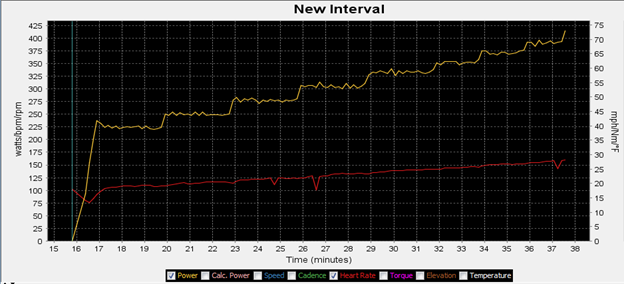
Calibration Test ProtocolIn their initial documentation, they included the below graph as a general indicator of what you’re looking for consistency wise:
5 min warm up
3 min Very Easy
3 min Easy
3 min Moderate
3 min Moderately Hard
3 min Very Hard

Once you’ve got the data imported into PowerAgent, you’ll want to go ahead and open the workout up in PowerAgent.
Highlight the section of the ride beginning with the warm up to the end of the fifth stage. Go to Tools > Configure PowerCal. There will be a pop-up window with the calibration highlighted. Click OK. Another pop-up window will appear confirming the new parameters. Click OK. A second pop-up window will appear asking if you would like to update the PowerCal. Make sure the ANT+ USB stick is in (you’ll need one by the way) and click OK. When finished it will confirm success.
Ultima modifica:


